
This article discusses how to connect and run an aftermarket ignition system with your Haltech Elite. The example we will use is the MDS DIS-4 Plus, but the concepts are the same for other manufacturer’s units. Basically, the interaction between the Elite and the aftermarket ignition system is exactly this: the Elite tells the aftermarket system when to fire. No more, no less. The Haltech does not supply power to the ignition system or the coils, it tells the ignition when to fire.
The steps are, in order,
- Install the unit according to the manufacturers instructions
- Connect the Ignition output wires from the Haltech to the proper wire on the ignition system, and
- Set up the appropriate coil parameters in the ESP software.
When wiring a DIS-4 Plus to an Elite 3SGTE PNP system, the connections are as follows:
- White wire from DIS-4 harness (Trigger 1) to Yellow/Black wire from Elite (IGN1)
- Green wire from DIS-4 harness (Trigger 2) to Yellow/Red wire from Elite (IGN2)
- Yellow wire from DIS-4 harness (Trigger 3) to Yellow/Orange wire from Elite (IGN3)
- Violet wire from DIS-4 harness (Trigger 4) to Yellow/Green wire from Elite (IGN4)
(Please note, these are the wire colors in the MSD documentation at the time of this writing, please double-check your own wiring)
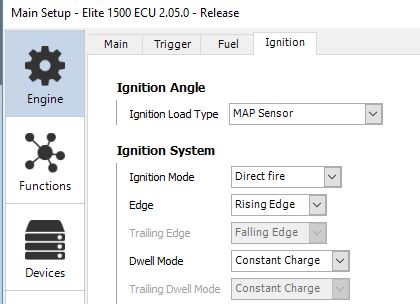
OK, you’re installed, you’re wired, what next? You need to set up the ESP software for your ignition system. With the key on and the ECU connected, under Main Setup -> Ignition, make sure you have Direct Fire enabled, and Edge and Dwell Mode as appropriate for your ignition system (for the DIS-4, use Rising Edge and Constant Charge).
You should be good to go.