
Caution!
Read these instructions and the Haltech Users Manual (included with the Haltech ESP software) first before installing and tuning.
Installation should only be attempted by an experienced mechanic. It is recommended you disconnect the battery (-) terminal before installation. Tuning should be performed by a professional tuner on a dynamometer, with a wideband O2 sensor.
NEVER ATTEMPT TO DRIVE AND TUNE AT THE SAME TIME!
It is strongly recommended that you install this system on a known working, running engine with spark plugs and ignition components within manufacturers specifications.
Legal for off-road use only. Remember – you are responsible for what you do to your engine.
OK, with that out of the way, let’s get started on getting your system safely installed and running.
Other Parts You May Need:
If you are installing on a GenII MR2 Turbo and desire to run in speed-density mode (using a map sensor), you need to install a Manifold Air Temperature sensor. Your kit includes a pre-wired MAT sensor. To install the MAT sensor in the intake manifold (in place of a cold-start injector), you need to purchase or fabricate a block-off plate. Contact us for details.
To perform in-cabin tuning, you will need to run a USB cable into the cabin. If your system included customization options (e.g., wiring for an electronic boost controller, external ignition or non-stock sensors), please read and follow the manufacturer’s instructions (as well as any custom instructions you receive from us) in addition to this document.
Installation (MR2 Turbo)
Remove the rear trunk carpet/cover on the rear firewall, and expose the stock ECU and wiring. Undo the bolts holding the stock ECU in place. Unplug the three connectors wired to the stock ECU. Remove the stock ECU and set aside.
Install the MAT sensor (if applicable). Run a vacuum line for the boost sensor (if applicable).
Install the interface unit and the Elite in the trunk in place of the stock ECU. Connect to your laptop USB cable.
Install and connect any optional wiring accessories.
Reconnect your battery.
That’s the “plug” part of “plug and play.”
Getting Started
0. If you are installing for the first time, or have made significant changes to the engine, I recommend attaching a battery charger to your battery before getting started. Few things are as frustrating as having your battery die while trying to get your engine running.
1. Load the Haltech ESP software on a laptop computer. A USB key comes with your system, or you can always download the latest version of the Haltech software at http://www.haltech.com/downloads-2/ecu-software-firmware/
2. Run the ESP software.
3. Connect to the Elite (turn key On, when it asks if you want to connect click OK)
4. If you requested we open the box and load your base map for you, skip this step. Otherwise – after the ECU initializes, load the startup map. Locate the startup map on your computer (it was likely sent to you as an email attachment). Copy the file to your Haltech\Ecu Maps folder. From the Haltech ESP user interface, select File -> Upload Map and select your startup map.
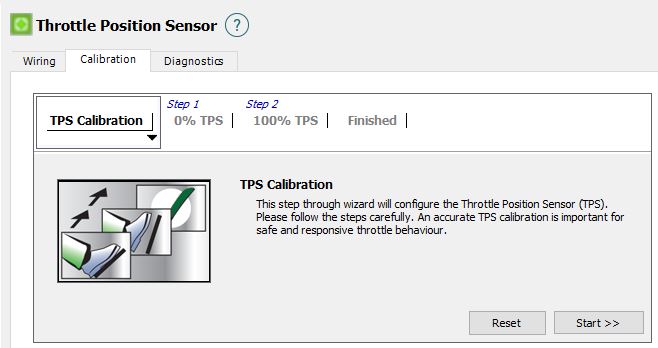
5. Calibrate the TPS – Select Setup -> Main Setup -> Functions -> Throttle Position Sensor and open the Calibration tab. Run the calibration wizard.
Steps 6 & 7 temporarily disable your engine so you can safely sync the ignition timing.
6. Check that injectors are OFF (not Enabled). Select Setup -> Main Setup -> Fuel from the menu, and check the box marked “Disable Injectors” and click “Apply.”
7. Lock Timing at 10° – From Main 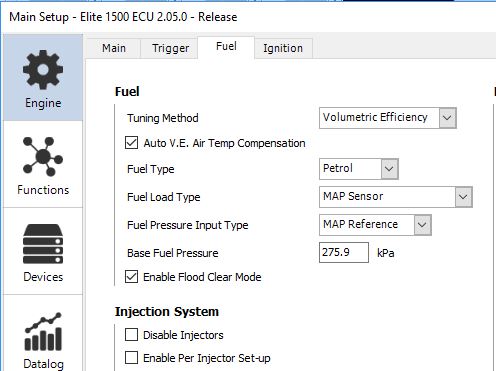 Setup, choose the Ignition tab and select “Always On” in the Lock Mode dropdown box.
8. Using a timing light, turn the engine over (it won’t start, because you disabled the injectors in step #6). Verify the timing (at 10°). If it is off, adjust the distributor and/or the TDC offset angle in the Trigger setup screen. If you are running a stock distributor, keep in mind that a LOT of 3s engines on the road have their cam timing off by as much as 1 (belt) tooth, this will require an approximately 15° change in offset angle. Personally, I would get the cam timing right before continuing, but that is up to you. NOTE: if you are running a separate 3rd-party crank sensor, you have some work to do in step 8. I can’t guess (from here) the relationship between where the missing teeth on your crank wheel pass the crank sensor and TDC on the Combustion Stroke. If the crank wheel is keyed (installs in the same position on every engine) and the supplier has provided guidance on position, use that guidance as a starting point for the offset. Keep in mind 2 things though – (1) even a keyed, consistent crank wheel is independent of engine stroke, so you could be off by 360°, and (2) whatever you do you want the TDC Offset value to be larger than the largest advance angle you plan to run (for a 2nd/3rd gen 3SGTE I want the TDC offset angle to always be 55° or more). Hint: if your value works out to under your target max advance, use (720 – value) instead.
9. Unlock the timing – From Main Setup, choose the Ignition tab and select “On During Flood Clear Only” in the Lock Mode dropdown box.
10. Enable the injectors – Select Setup -> Main Setup -> Fuel from the menu, un-check the box marked “Disable Injectors” and click “Apply.”
11. Start tuning. Turn off all auxiliary maps and tune the fuel map first, tune from low load to high load, and adjust from rich to lean (not lean to rich). Next tune the timing map, again, go from conservative values and slowly add timing advance. Finally, enable and tune your choice of auxiliary maps.